
I recently decided to see how useful a coding model I could run on my own hardware. There is now a second graphics card in the mail, so you can probably guess how the experiment went.
I have a pretty strong do-it-yourself (DIY) streak. I wrote about it years ago in Please Learn to Do It Yourself, and I keep finding new places to apply the same principle. I put an aerial antenna on the roof so I wouldn’t have to pay for cable. I built a server in the basement and put Plex on it. I use the Plex server for digital media backups and as a digital video recorder (DVR), and Plexamp gives me the Spotify-like music experience without another music subscription. I do my own home renovations, with varying levels of confidence and paint on the walls. Running a local model belongs in that same category: when I can buy the equipment once and avoid another subscription, I generally want to see whether I can make it work.
I was also pretty hesitant to use large language models (LLMs) in the first place. I find the thoughtless way chatbots with no clear purpose have been pushed into consumer products annoying, and I find generative art ethically problematic. Those objections haven’t disappeared. Models trained on open-source code repositories feel less gross, though, and have become undeniably useful. Coding agents, which let a model inspect files and operate tools instead of only returning text, are now powerful enough to be genuinely productive for a lot of enterprise coding and general office work. At this point, denying that feels foolish.
I think smaller local models are going to be sufficient for most users. Frontier models will keep pushing the boundary, and there will still be plenty of work that needs them, such as penetration testing, operating-system development, and genuinely enormous software systems. But most business applications, office work, summarization, research, and everyday coding seem well within reach of an open-weight model whose learned parameter data can be downloaded and run on hardware its owner controls.
Microsoft’s early ambition was “a computer on every desk and in every home.” Bill Gates later said the internal version added “running Microsoft software.” I think agentic tools are approaching a similar moment. A capable coding agent on every desk becomes much more plausible when a shared open-weight model can run on a machine in the closet, without charging for every prompt or tool call.
The economics are part of the appeal. I can pay for the hardware and electricity up front, avoid another recurring subscription, and stop watching a per-token meter. Source code and private documents can also stay in the house. I like owning the appliance more than renting access to it.
I wanted to try that for myself: a small local service at home, reachable from my work machine over a private network, with a decent coding agent in front of it. I considered running the model directly on my work MacBook, but I wanted the server containerized so it would be isolated and easy to reproduce. Docker Desktop runs Linux containers inside a virtual machine on macOS, and its direct container GPU support is limited to Windows with the Windows Subsystem for Linux 2 (WSL 2) backend. Running the server on my home machine (which is running Bazzite) let me keep the container and give it direct access to the GPU. Inference is the term for running a trained model to generate a response.
I started with Bazzite, an NVIDIA GeForce RTX 4060 Ti with 16 GB of video random-access memory (VRAM), 64 GB of fifth-generation double-data-rate (DDR5) system memory, and a Gigabyte Z690 Aorus Master motherboard. The setup I landed on is a Podman-managed llama.cpp server, an Open WebUI frontend, and Tailscale connecting the whole thing to the machines I actually use. A 24 GB RTX 3090 is the planned second card.
Picking a Model That Fits
It is very easy to pick an exciting model and only afterward discover that it doesn’t fit in the available memory. The headline parameter count isn’t enough to plan around, either.
A model’s parameters are the numeric values it learned during training. A dense model uses all of them for every token, which is a small chunk of text or code. A mixture-of-experts (MoE) model may have a large total parameter count while activating only a much smaller subset for each token. That can reduce the computation required to generate a token, even though all of the model’s weights still have to be stored somewhere.
The inactive experts still have to live somewhere, but some can stay in system random-access memory (RAM) and be handled by the central processing unit (CPU). A local setup has some flexibility here: keep as much as practical in VRAM and use system RAM for the rest.
The relevant terms are easy to mix up:
- VRAM is memory attached directly to the graphics processing unit (GPU). It has high bandwidth and is where inference wants its working set. NVIDIA’s CUDA programming guide has a useful overview of GPU and system memory.
- System RAM is bigger and cheaper, but the GPU reaches it more slowly. It works well for CPU-offloaded experts; a swap file does not make it VRAM.
- Quantization stores the model’s weights at a lower precision to reduce its memory requirements. Q4, Q6, and Q8 are families of roughly 4-, 6-, and 8-bit quantizations with different size and quality tradeoffs.
- Context length is the maximum number of tokens the server can keep in one conversation. Increasing it allocates a larger key-value (KV) cache, which stores attention data from previous tokens separately from the model weights.
I found out the hard way that a model can fit when it loads and still fail when the server allocates its context cache.
The model supports a native 256K context, but allocating its KV cache takes a significant amount of memory. On the 4060 Ti alone, 256K was too much once I accounted for the model and runtime buffers. I started at 128K and planned to try 256K again after adding more VRAM.
Why Qwen
When I started shopping around, I wanted to use the latest and greatest model available specifically for coding, but it still had to fit the machine I already owned. A long context window and decent tool use narrowed the field further. I also wanted weights I could download and run without subscribing to a hosted model service.
Qwen is Alibaba’s family of open-weight language models. It includes general-purpose instruct models, reasoning variants, vision-capable models, and models tuned specifically for code. The family is attractive for local use for a few practical reasons:
- There is a strong open-weight ecosystem, including GGUF, a single-file model format designed for efficient inference and supported by
llama.cpp. - The models come in several sizes and quantizations, so the hardware does not have to be selected from one all-or-nothing model.
- The coding models are designed for the prompts, tool calls, and repository tasks that coding agents generate.
- Qwen3-Coder-Next is published under the permissive Apache 2.0 license; the license still deserves a check for the exact artifact being downloaded.
There are plenty of good alternatives. Llama and Mistral have broad local tooling and large communities. DeepSeek’s MoE models offer impressive capability per active parameter, and Gemma is compelling at smaller sizes. Qwen3-Coder-Next happened to offer the best combination of coding ability, tool use, license, context length, and downloadable quantizations when I was ready to build the machine. That answer will keep changing as new models appear.
Why Qwen3-Coder-Next
Qwen3-Coder-Next is an 80B-A3B coding model: a large MoE model with roughly 80 billion parameters in total and 3 billion active for each generated token. It uses a hybrid architecture with Gated DeltaNet and Gated Attention layers, two approaches for deciding which earlier tokens should influence the next one. The model card lists a native context length of 262,144 tokens. Its available GGUF quantizations gave me a few ways to make that model fit:
| Quantization | Approximate file size | Tradeoff |
|---|---|---|
| UD-Q4_K_XL | ~50 GB | Practical quality/speed starting point |
| UD-Q6_K / Q6_K | ~66 GB | Higher weight fidelity, more CPU/RAM traffic |
| Higher precision | Larger still | Better fidelity, increasingly impractical locally |
The exact size depends on the artifact and quantization build, so check the file listing before starting a very large download. These are only the rough numbers I used for planning.
I chose UD-Q4_K_XL. It gave me a reasonable balance between quality and size, while still letting the machine put some experts in system RAM. I preferred offloading those experts to the CPU over using a more aggressive quantization on the whole model.
Why llama.cpp
I decided early that I wanted to run the model with llama.cpp. It felt like “doing the simplest thing that could possibly work”: load a GGUF, use CUDA, NVIDIA’s platform for running general-purpose computation on a GPU, and expose an OpenAI-compatible application programming interface (API). That API shape is widely supported by model clients, so I could swap either side without writing custom integration code.
A more elaborate harness such as Ollama can take care of model downloads, configuration, and management. I was only trying to serve one model, though, and preferred having fewer layers between it and the GPU. llama.cpp is open source, runs entirely on my machine, and doesn’t require a hosted service or vendor account.
Running It in Bazzite
Bazzite is an atomic Fedora-based desktop operating system, meaning the core operating-system image is updated as a unit instead of being assembled from a pile of individually modified host packages. I wanted to work with that design, and its built-in Podman setup made containers the obvious fit for this project.
I chose Podman rather than adding a full Docker installation because Podman was already part of Bazzite’s normal tooling. It is open source, daemonless, and able to run containers as an ordinary user. It also uses Open Container Initiative (OCI) standards for container images and runtimes, so I can use the same public images without installing Docker Desktop, running another privileged background daemon, or signing into a container registry.
The three pieces are:
- A CUDA-enabled
llama.cppcontainer. - An Open WebUI container.
- A systemd user service for each one, generated from a Podman Quadlet file.
A Quadlet is a declarative container definition that Podman turns into a systemd service. It gives the container a normal lifecycle: start, stop, restart, logs, dependencies, and boot activation. It also avoids the classic home-server arrangement where a shell history contains the only copy of the command that made the service work.
NVIDIA access
For an NVIDIA GPU, Podman needs a Container Device Interface (CDI) specification, which tells the container runtime how to expose third-party hardware. After installing the NVIDIA card and confirming that the host driver works, I generated one with:
sudo nvidia-ctk cdi generate --output=/etc/cdi/nvidia.yaml
A basic sanity check is:
podman run --rm \
  --device nvidia.com/gpu=all \
  --security-opt=label=disable \
  ubuntu nvidia-smi
I needed --security-opt=label=disable because Security-Enhanced Linux (SELinux), the mandatory access-control system used by Fedora, otherwise blocked the rootless container from accessing the NVIDIA device on this Bazzite setup. This was an acceptable tradeoff for my personal machine. I would want to understand the security implications before using the same setting in a multi-tenant production environment.
The llama.cpp Quadlet
I put this in ~/.config/containers/systemd/llama-server.container:
[Unit]
Description=llama.cpp server (Qwen3-Coder-Next)
Wants=network-online.target
After=network-online.target

[Container]
Image=ghcr.io/ggml-org/llama.cpp:server-cuda
ContainerName=llama-server
AddDevice=nvidia.com/gpu=all
SecurityLabelDisable=true
Network=host
Volume=%h/.cache/llama-server:/root/.cache:Z,U
Exec=-hf unsloth/Qwen3-Coder-Next-GGUF:UD-Q4_K_XL \
  --jinja \
  -c 131072 \
  --host 0.0.0.0 \
  --port 8080 \
  --alias qwen-coder \
  --split-mode layer \
  -ngl 99 \
  --n-cpu-moe 44 \
  -fa on \
  -b 2048 \
  -ub 2048 \
  --cache-reuse 256 \
  --temp 1.0 \
  --top-p 0.95 \
  --top-k 40 \
  --min-p 0.01

[Service]
Restart=on-failure
TimeoutStartSec=900

[Install]
WantedBy=default.target
Podman’s Exec= setting passes these arguments to the command already defined by the container image, which is llama-server in this case. The backslashes use systemd’s line-continuation syntax to keep one setting readable across several lines; the generated service still passes it to the container as one command.
The llama-server documentation has the complete option list. Here is what this particular command asks it to do:
-hf unsloth/Qwen3-Coder-Next-GGUF:UD-Q4_K_XLidentifies a Hugging Face repository and quantization.llama.cppdownloads the matching GGUF if it is not already cached, then loads it. The text after the colon selectsUD-Q4_K_XLfrom the files published in that repository.--jinjaenables the model’s Jinja chat template. The template turns the API’s system, user, assistant, and tool messages into the exact token pattern Qwen was trained to understand. That matters for a coding agent because tool calls are part of the conversation.-c 131072allocates a context window of 131,072 tokens, or 128K. This is the combined working space for the prompt, conversation history, tool results, and generated response. A larger number lets the model remember more, but increases the KV-cache allocation described earlier.--host 0.0.0.0listens on every network address available to the container. Because this Quadlet uses host networking, that includes the Bazzite machine’s Tailscale address. It also makes the host firewall important: this flag does not limit access to the tailnet by itself.--port 8080chooses the Transmission Control Protocol (TCP) port where the Hypertext Transfer Protocol (HTTP) API listens. Clients therefore use an address ending in:8080/v1for the OpenAI-compatible API.--alias qwen-coderpublishes the short nameqwen-coderthrough the API. Clients can keep using that name even if I later change the repository or quantization behind it.--split-mode layertellsllama.cppto divide the model layer by layer when more than one GPU is available. It makes little difference with the original single card, but it is the split I plan to start with when the 3090 arrives.-ngl 99sets the maximum number of model layers to store in VRAM. Ninety-nine is deliberately higher than this model’s layer count, so it requests the maximum possible layer offload. The following CPU-MoE setting still takes precedence for the expert weights it covers.--n-cpu-moe 44keeps the MoE expert weights from the first 44 layers in system RAM and evaluates them on the CPU. This is the main compromise that lets the much larger model fit alongside its context cache on a 16 GB GPU.-fa onenables FlashAttention, an attention implementation designed to reduce memory traffic. It generally lowers the cost of processing the context on supported hardware.-b 2048allows a logical batch of as many as 2,048 prompt tokens. A batch here is simply a group of input tokens processed together.-ub 2048allows the physical batch sent to the hardware to be just as large. Larger batches can ingest a long prompt faster, but they also need more temporary memory; this is another value to reduce if the server runs out of memory while processing a prompt.--cache-reuse 256asks the server to reuse cached prompt chunks of at least 256 tokens. Coding agents repeatedly send much of the same conversation and instructions, so reusing the already-processed prefix can avoid doing that work again.--temp 1.0sets the sampling temperature. A value of1.0leaves the model’s relative token probabilities at their normal scale; lower values make its choices more predictable, while higher values make unlikely choices more competitive.--top-p 0.95keeps the smallest group of likely next tokens whose combined probability reaches 95 percent, then samples from that group.--top-k 40also limits sampling to the 40 most likely next tokens.top-kandtop-pwork together to discard implausible choices before one is selected.--min-p 0.01discards a token when its probability is less than one percent of the most likely token’s probability. This is a relative cutoff, so its effect changes depending on how confident the model is.
The temperature, top-p, and top-k values match Qwen’s published generation configuration. min-p adds another permissive filter on the long tail of unlikely tokens. These are server defaults; a client can supply different sampling values with an individual request.
The rest of the Quadlet controls how that server runs as a container.
Network=host avoids an extra rootless port-forwarding layer. My first attempt used Podman’s default networking, and the model download appeared to hang: the container was up, the port was published, but connections were reset. Host networking made the behavior predictable and let the server bind directly to port 8080.
Volume=%h/.cache/llama-server:/root/.cache:Z,U solved a couple of problems. %h is the systemd specifier for the user’s home directory; Quadlet doesn’t run a shell, so it won’t expand ~. I mounted all of /root/.cache because Hugging Face stores the downloaded model under /root/.cache/huggingface, which I learned after initially mounting the wrong subdirectory. The :Z,U options relabel the directory for SELinux and adjust ownership for the container user.
Qwen Code configuration
Qwen Code is the open-source coding-agent harness on the machines where I want a terminal and repository tools. I chose it because it could use the same local OpenAI-compatible API while providing the file, shell, and repository tools needed for coding. Pointing it at my own server also avoids a hosted coding-agent account. Its provider configuration identifies the model by its short alias:
{
  "modelProviders": {
    "openai": [
      {
        "id": "qwen-coder",
        "name": "qwen-coder",
        "baseUrl": "http://localhost:8080/v1",
        "envKey": "QWEN_CUSTOM_API_KEY_OPENAI_HTTP_LOCALHOST_8080_V1",
        "generationConfig": {
          "contextWindowSize": 131072
        }
      }
    ]
  },
  "security": {
    "auth": {
      "selectedType": "openai"
    }
  },
  "model": {
    "name": "qwen-coder",
    "baseUrl": "http://localhost:8080/v1"
  }
}
The actual Qwen Code settings file also contains its user interface (UI) and API-key bookkeeping. For this setup, make sure the qwen-coder name and OpenAI-compatible /v1 address point at the server, and that the context value matches the server’s -c argument. Some Qwen Code versions generate envKey from the provider address, so preserve the key Qwen Code creates if it differs from this example.
On a remote client, replace localhost with the Bazzite Tailscale hostname, for example http://bazzite:8080/v1.
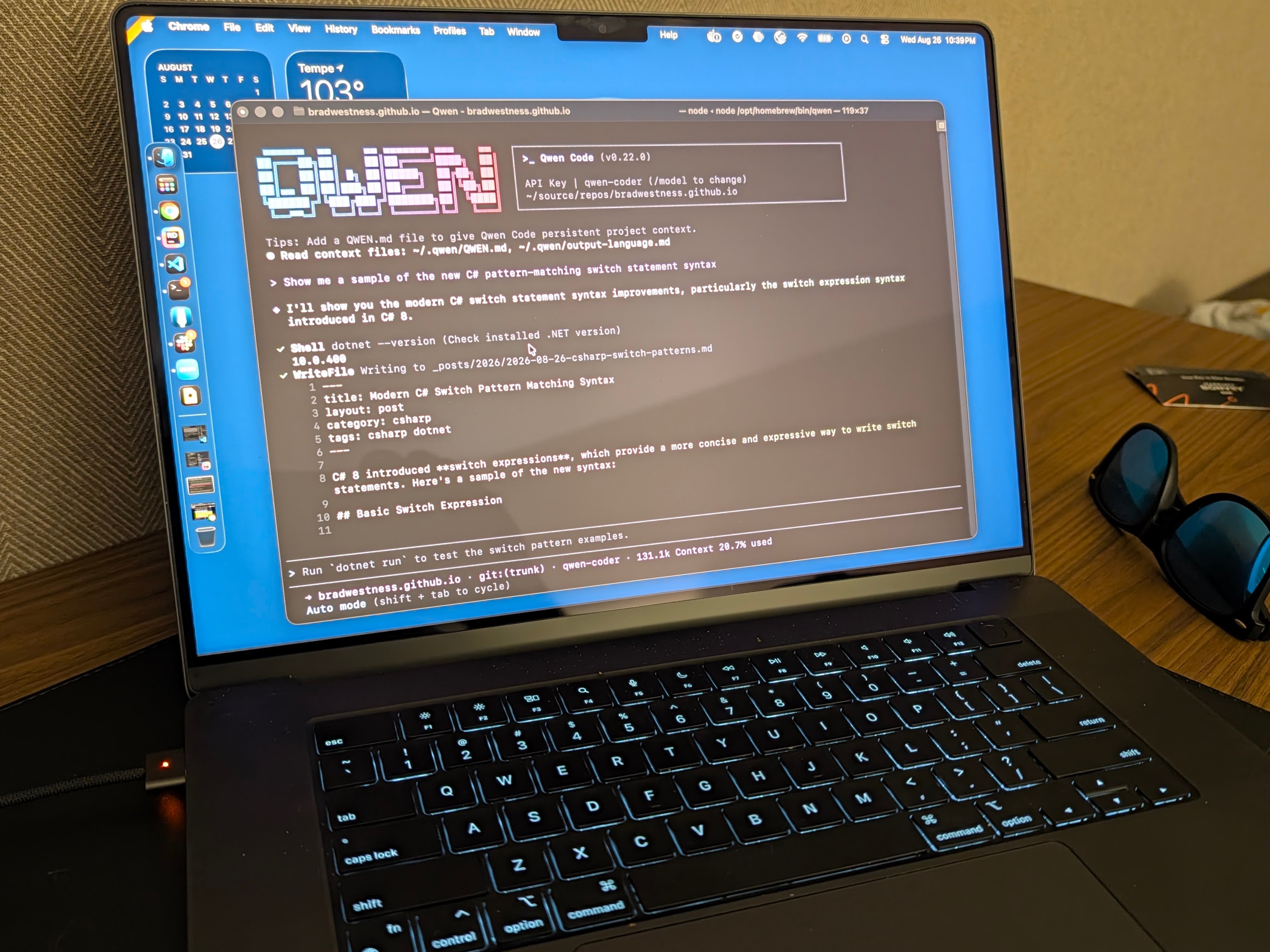
The first-start workflow is:
mkdir -p ~/.cache/llama-server
systemctl --user daemon-reload
systemctl --user enable --now llama-server
journalctl --user -fu llama-server
Systemd will report that the service started long before the model finishes loading. Wait for the server to report that it is listening, then verify it from the host:
curl -s http://localhost:8080/v1/models | jq
curl -s http://localhost:8080/health
The GPU/RAM configuration
The two most machine-specific values in that command are -ngl 99 and --n-cpu-moe 44. Those are the settings that made my first 128K configuration fit on the 16 GB card. The right balance depends on the exact quantization, context length, the desktop’s own graphics overhead, driver, and available GPUs.
This requires some care because -ngl 99 requests maximum layer offload, while the context cache and runtime buffers also need VRAM. Leave headroom on the display-driving 4060 Ti instead of treating every free megabyte as available to inference.
I wasn’t trying to use every last byte of VRAM. The RTX 4060 Ti also drives the desktop, so I wanted visible headroom for the GNOME desktop, a browser, and temporary allocations. Freezing the desktop in exchange for a slightly better benchmark would make for a pretty lousy home server.
I used NVIDIA’s System Management Interface (nvidia-smi) while the model loaded and while a real coding session ran:
watch -n2 nvidia-smi
When the second card arrives, I can split the model over both CUDA devices. The 3090’s 24 GB of VRAM and much higher memory bandwidth make it a better home for most of the model than the 4060 Ti. I plan to keep the displays on the 4060 Ti and leave the larger card focused on inference. The exact split will still need some experimentation because the context cache and temporary buffers need room alongside the model.
I briefly considered an old datacenter GPU because the listings promised 24 GB or 32 GB of memory. The K80 is actually two 12 GB GPUs on one board, expects a server’s cooling, and belongs to a much older CUDA generation. The V100 has more useful memory, but it is still a passive server card with driver and cooling complications. A used RTX 3090 has 24 GB of fast graphics double-data-rate 6X (GDDR6X) memory and a cooler designed for a desktop. In this case, the boring option won.
Open WebUI: The Chat Frontend
A coding agent isn’t always the right interface. Sometimes I want to ask a question from my phone, look something up, or have a normal conversation without opening a terminal in a repository. I chose Open WebUI for that because it is self-hosted, provider-agnostic, and able to run entirely offline. It gives me chat history, a mobile-friendly interface, and optional search while continuing to use the same OpenAI-compatible llama.cpp endpoint. It uses a local account for the interface, but it doesn’t require an account with Open WebUI or another hosted chat service.
I put this in ~/.config/containers/systemd/open-webui.container:
[Unit]
Description=Open WebUI (chat frontend for llama.cpp)
Wants=network-online.target
After=network-online.target

[Container]
Image=ghcr.io/open-webui/open-webui:main
ContainerName=open-webui
Network=host
Environment=PORT=8081
Environment=OPENAI_API_BASE_URL=http://localhost:8080/v1
Environment=OPENAI_API_KEY=none
Environment=ENABLE_OLLAMA_API=false
Volume=%h/.open-webui:/app/backend/data:Z,U
AutoUpdate=registry

[Service]
Restart=on-failure
TimeoutStartSec=300

[Install]
WantedBy=default.target
The :Z,U suffix matters here too. Without it, Open WebUI started and then failed its SQLite database migration because it could not create /app/backend/data/uploads. I initially went looking for an application problem, but the restart loop was caused by the mounted directory’s ownership and SELinux label.
Start it with:
mkdir -p ~/.open-webui
systemctl --user daemon-reload
systemctl --user enable --now open-webui
journalctl --user -fu open-webui
Then browse to http://bazzite:8081 or the machine’s Tailscale address. The first local Open WebUI account created becomes the administrator, so I created that account before treating the interface as ready.
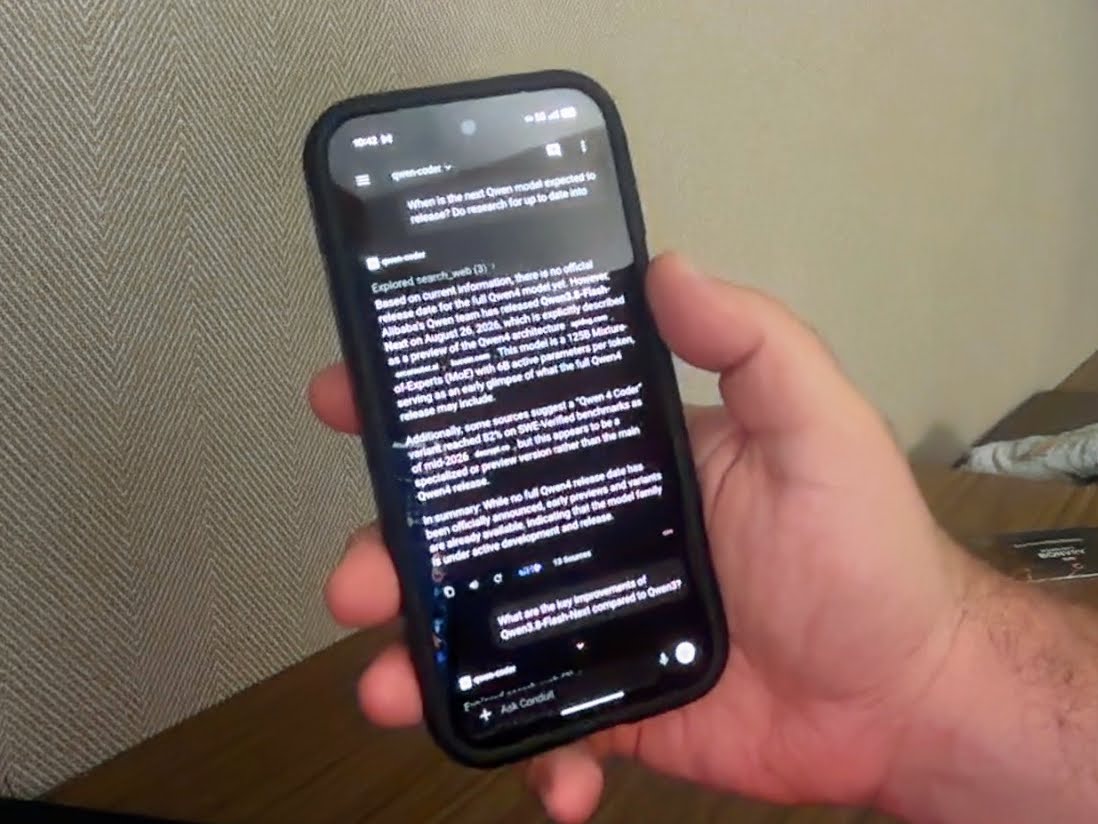
The environment variables in the Quadlet point Open WebUI at the local llama.cpp server. Open WebUI also provides a useful place to enable web search. The model has no built-in connection to current events, so the interface has to execute a search and put the results into the prompt.
Tailscale: The Network in the Middle
I did not want to expose ports 8080 or 8081 to the public internet, and I did not want to configure router port forwarding. Tailscale gives the Bazzite machine and the client machines addresses on the same private network, which Tailscale calls a tailnet.
Tailscale is the one part of this setup that does require an account. It delegates login to an existing identity provider, and Google is one of the supported options, so I could sign in with the Google account I already use instead of creating another password. I accepted that hosted coordination piece because it made the private network dramatically simpler to set up and use from the Mac and Android clients.
Install Tailscale on the Bazzite host and the Mac or Android device, sign them into the same tailnet, and use the Bazzite hostname or its 100.x.y.z address:
sudo systemctl enable --now tailscaled
sudo tailscale up
tailscale status
Bazzite’s local firewall may still need to allow traffic arriving on tailscale0. I added the interface to firewalld’s trusted zone:
sudo firewall-cmd --permanent --zone=trusted --add-interface=tailscale0
sudo firewall-cmd --reload
Tailscale handles the private overlay connection, including network address translation (NAT) traversal for machines behind ordinary home routers. Anyone who can reach the tailnet and get through the host firewall can also reach an unprotected service, so an API key is worthwhile if the endpoint is shared with more people. llama.cpp warned that cross-origin resource sharing (CORS) was open and no API key was configured. I was comfortable with that for a temporary experiment on my own tailnet, but I wouldn’t treat it as a meaningful security boundary.
From another machine, the checks are simple:
curl -s http://bazzite:8080/v1/models
curl -s http://bazzite:8081
The same addresses work from an Android browser once the Tailscale app is connected. Open WebUI can be added to the home screen, which is a much nicer mobile experience than trying to run a terminal coding agent on a phone.
Making It Survive a Reboot
A user Quadlet with WantedBy=default.target starts as the user manager starts. To start it at boot even when I have not logged in interactively, I enabled lingering:
sudo loginctl enable-linger "$USER"
loginctl show-user "$USER" | grep Linger
The output should include Linger=yes. After that, the two services are ordinary user services:
systemctl --user status llama-server open-webui
systemctl --user restart llama-server
systemctl --user restart open-webui
journalctl --user -u llama-server
journalctl --user -u open-webui
If AutoUpdate=registry is enabled on a Quadlet, also enable the user-level Podman auto-update timer if automatic image refreshes are desired:
systemctl --user enable --now podman-auto-update.timer
Quadlet does not keep the machine awake. If Bazzite suspends, the model server and Open WebUI become unreachable until the machine wakes. Since I want this machine to act as a server while it is plugged in, I disabled automatic suspend while it is running on wall power. An incoming Tailscale request isn’t going to wake the GPU for me.
The Road Ahead
I wound up with a small, private local artificial intelligence (AI) stack. Qwen Code on my work machine connects through Tailscale directly to the OpenAI-compatible llama.cpp server on port 8080. From a browser or Android phone, I connect to Open WebUI on port 8081, which sends its model requests to that same server.
Qwen Code provides the repository tools, while Open WebUI provides history, search, and a phone-friendly interface. Both use the qwen-coder alias, and llama.cpp loads the actual Qwen model and generates the tokens. Keeping those pieces separate makes it relatively easy to replace any one of them later.
I’m pretty happy with it. The model is useful enough to keep running, the clients don’t care which GGUF is behind the alias, and none of it depends on a metered model account. Once the second graphics card arrives, I get to tune it all over again.
The more interesting question is what this looks like a few years from now. I can imagine plenty of organizations putting a machine with a couple of GPUs in a rack or a closet and making a local model available to every employee. Most of the cost would be paid up front, followed by electricity and the ordinary work of maintaining another server. Within the machine’s capacity, people could use it as much as they wanted without watching token budgets, allocating vendor credits, or discovering an unexpected model bill at the end of the month.
Local inference could democratize agentic coding tools by making them available to a much wider group of people. A large company can absorb a frontier-model subscription or application programming interface bill. That gets harder for an individual developer, a school, a nonprofit, or a small company, particularly when an agent may make hundreds of model calls while it reads a repository, edits code, runs tests, and corrects its own mistakes. Even a modest charge per call adds up, and an unpredictable bill discourages the experimentation that helps people learn what these tools can do.
A self-hosted model changes that calculation. The hardware still costs real money, but it can be bought used, upgraded a piece at a time, and shared. Once it is running, another prompt or another coding session mostly consumes time and electricity. An individual can let an agent work through a problem without wondering whether the attempt is worth another dollar, while a small organization can give the whole staff access without buying a separate seat for everyone.
Hosted frontier models will still have a place for jobs that need more capability than a small local server can provide. A local server can handle the routine work and leave the paid services for the occasions that genuinely need them. For everyday coding, document work, search, and summarization, a shared open-weight model could become as ordinary as the file server used to be. The source code and internal documents would stay inside the organization, the finance department would know what inference costs before everyone started using it, and more people would get access to the tools in the first place. A coding agent on every desk no longer sounds quite so far-fetched.